
Most businesses replace printers before they question their A4 copy paper. Yet poor-quality paper not faulty equipment causes many of the printing problems companies quietly blame on their printer.
Choosing A4 copy paper is treated as a five-minute decision: check the price, order a box, move on. But paper is the one printing variable used in every single print job, every day, across every department. A wrong choice doesn’t show up as a bad decision it shows up as a jammed printer during a client meeting, a reprint run at month-end, or a document that looks unprofessional despite a perfectly good design.
Many businesses end up buying the wrong paper for one simple reason: nobody explains what actually differentiates one ream of A4 from another. GSM, brightness, opacity, and moisture content sound like spec-sheet trivia until one of them is wrong for your printer or your use case, and the cost shows up in wasted ink, wasted time, and wasted paper.
This guide breaks down exactly what to look for when buying A4 copy paper the specifications that matter, the mistakes that quietly cost businesses money, and the questions worth asking before you place your next order.
What Is A4 Copy Paper?
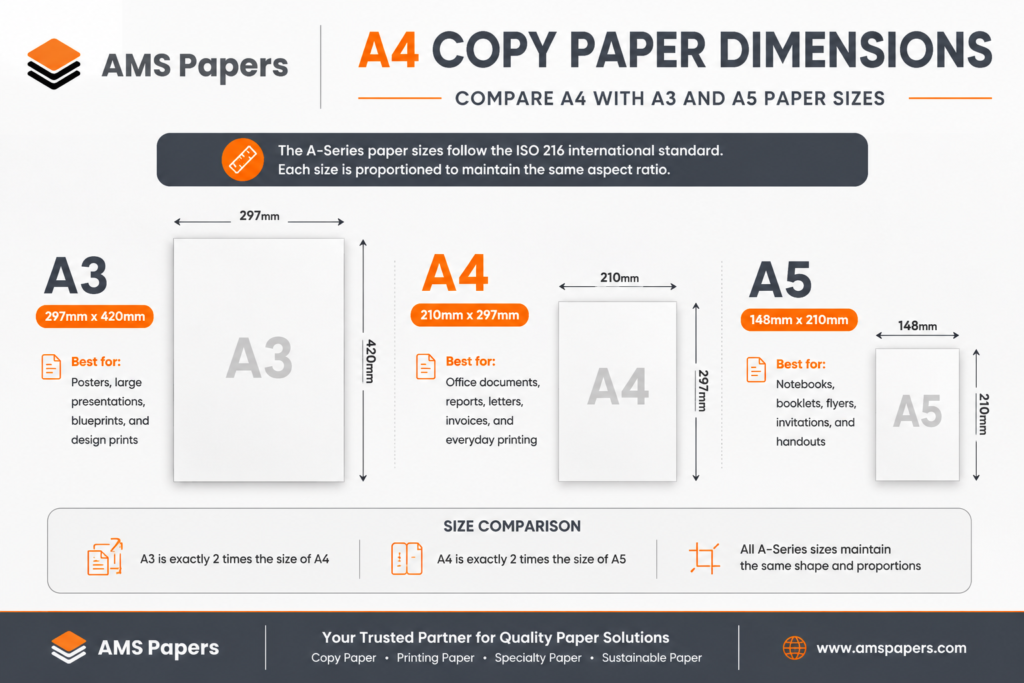
A4 copy paper is the standard paper size used across offices, schools, and businesses in most of the world, measuring 210mm × 297mm under the ISO 216 international paper size standard. ISO 216 defines a series of paper sizes (A0 through A10) based on a consistent aspect ratio, which is why an A4 sheet folds evenly into A5, and two A4 sheets combine into an A3.
A4 dominates business printing because it’s the accepted default for nearly every document type: letters, invoices, reports, contracts, forms, and general office printing. It’s compatible with virtually every printer, copier, and scanner sold for office use, and it’s the standard size referenced in most business software templates.
In the Americas, “Letter” size (215.9mm × 279.4mm) is more common, which is worth noting if your business operates across regions the two sizes aren’t interchangeable, and mixing them into shared templates or filing systems causes formatting issues.
Suggested graphic: a labeled illustration comparing A4 dimensions (210mm × 297mm) against A3 and A5, showing the consistent aspect ratio.
Why A4 Copy Paper Quality Matters More Than Price
Most businesses compare A4 copy paper on price per ream. That’s the wrong comparison. The number that actually affects your budget is cost per successful print what a ream costs once you factor in jams, reprints, wasted ink, and the time employees spend dealing with all three.
Cheap, inconsistent paper causes printer downtime through jams and misfeeds, which pull staff away from their actual work to clear a paper path or restart a print job. It causes wasted ink and toner, since low-quality or overly absorbent paper often requires more ink to achieve the same print density. It causes reprints, when a document comes out streaked, curled, or misaligned and has to be run again. And it causes a less visible cost: the cumulative productivity loss of employees repeatedly dealing with printer issues instead of their actual work.
A ream that’s a dollar cheaper but jams once a week isn’t cheaper it’s more expensive, once you account for the interruption, the wasted sheets, and the wear on the printer itself. Paper that performs consistently, print after print, is the actual cost-saver, even at a slightly higher price per ream.
Understanding A4 Copy Paper GSM
GSM (grams per square meter) measures paper weight and thickness the higher the GSM, the heavier and more substantial the sheet feels. GSM is one of the most important specs to match to your use case, because the wrong weight can cause feed issues in printers calibrated for a specific range.
| GSM | Best Use |
|---|---|
| 70 | Drafts, internal documents, high-volume everyday printing |
| 75 | Everyday office printing, general correspondence |
| 80 | Professional documents, client-facing letters and reports |
| 90 | Reports, documents with double-sided printing needs |
| 100 | Presentations, proposals, and premium client documents |
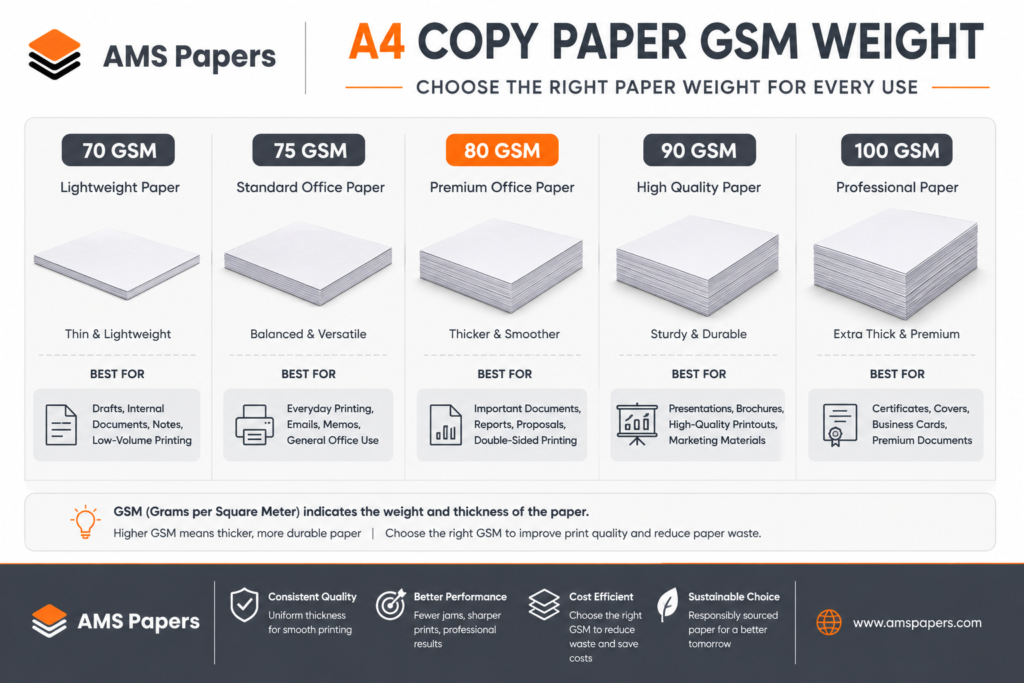
Most offices default to 75–80 GSM for daily use it balances cost with a professional finish. Businesses that print client-facing documents, presentations, or anything meant to be handled and retained (contracts, proposals) often step up to 90–100 GSM, since heavier paper feels more substantial and holds up better to handling.
A4 Copy Paper Brightness Explained
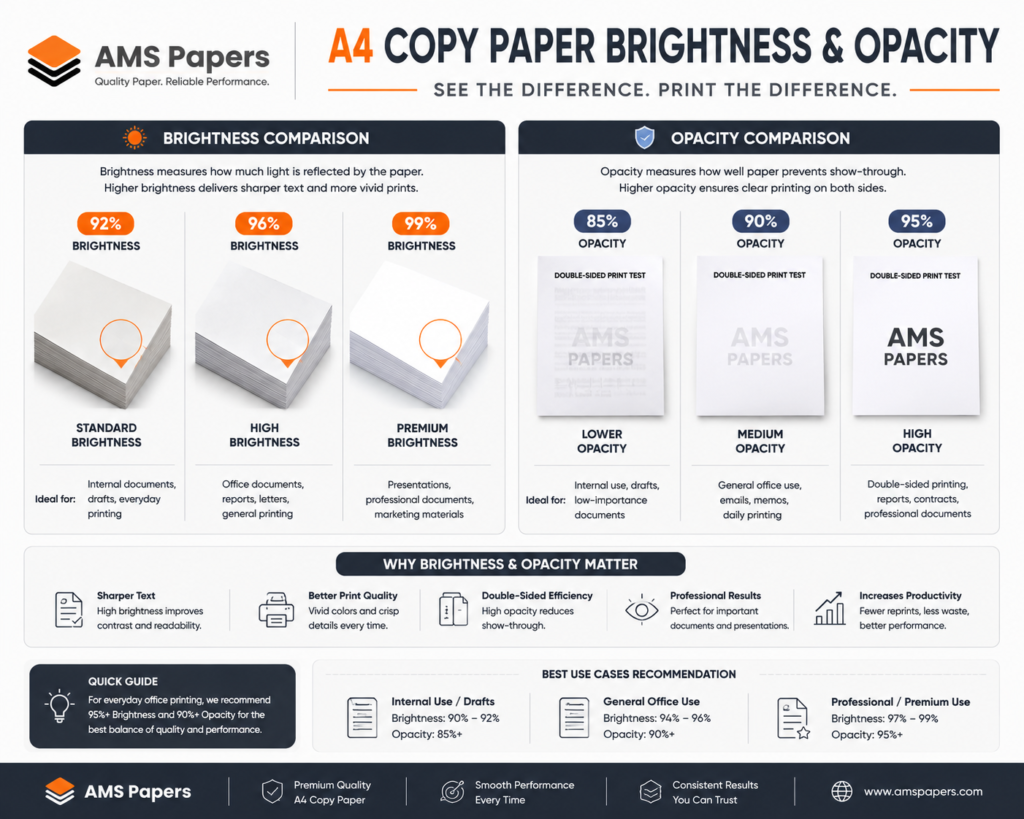
Brightness and whiteness are frequently confused, but they measure different things. Brightness measures how much light a sheet reflects, typically on a scale up to 100+ higher brightness improves contrast between ink and paper, making text and images appear sharper. Whiteness measures the actual color tone of the paper, including subtle blue or cream undertones, which affects how “white” a page looks to the eye rather than how much light it reflects.
A paper can have high brightness but a warm or cool tint depending on whiteness which is why two “bright white” reams can still look noticeably different side by side. For business documents, higher brightness generally improves image quality and text contrast, which matters most for presentations, marketing materials, and anything with graphics or photos. For internal drafts, brightness matters far less.
A4 Copy Paper Opacity and Why It Matters
Opacity measures how much text or print shows through from one side of a sheet to the other low opacity means show-through, where printing on one side is visible (and distracting) when you look at the reverse side. This matters most for double-sided printing, where poor opacity makes documents harder to read and look unprofessional.
It matters even more for legal, financial, and other professional documents, where show-through can actually obscure text or create ambiguity about what’s printed on which side. Heavier GSM paper generally has better opacity, which is one reason professional and legal documents are often printed on 90–100 GSM stock rather than standard 75–80 GSM office paper.
A4 Copy Paper Smoothness Explained
Smoothness affects how well toner or ink adheres to the page. A smoother sheet allows toner to bond more evenly in laser printers, and lets ink transfer more precisely in inkjet printers, resulting in sharper text and cleaner lines. Rougher, lower-quality paper can cause uneven toner adhesion, smudging, or ink that bleeds slightly into the fibers, softening fine detail.
Smoothness also affects wear on your printer over time rougher paper stock creates more friction as it passes through rollers and feed mechanisms, contributing to gradual wear that shortens the working life of the equipment. Consistently smooth paper is one of the less obvious ways paper quality protects your hardware investment, not just your print quality.
A4 Copy Paper Moisture Content
This is a factor almost no one discusses when buying A4 copy paper and it’s one of the more common hidden causes of printing problems. Paper is hygroscopic, meaning it absorbs and releases moisture from the surrounding air. Paper stored in a humid environment, or shipped through varying climates, can absorb enough moisture to change its stiffness and flatness.
High moisture content causes sheets to curl, which leads directly to paper jams and misfeeds, since curled paper doesn’t pass evenly through printer rollers. It can also cause sheets to stick together, leading to multi-sheet feeds and additional jams. Paper stored correctly sealed in its original packaging, in a stable, moderate-humidity environment maintains consistent moisture content and feeds far more reliably than paper left exposed to fluctuating conditions in a warehouse or stockroom.
Choosing A4 Copy Paper for Different Businesses
Offices
General offices typically do best with 75–80 GSM paper at standard brightness, balancing cost with a professional appearance for both internal and client-facing documents.
Schools
Schools generally prioritize cost-efficiency for high-volume printing 70–75 GSM paper suits most day-to-day administrative and classroom printing needs.
Print Shops
Print shops need a range of GSM and finish options on hand, since client jobs vary widely from 80 GSM standard runs to 100+ GSM for premium print jobs, presentations, and marketing materials.
Government
Government offices typically require consistent, higher-opacity paper (80–90 GSM) for official documents, records, and forms where legibility and archival quality matter.
Healthcare
Healthcare settings often need reliable, higher-opacity paper for records and forms, along with consistent supply to avoid disruptions in patient documentation workflows.
Retail
Retail businesses typically need a mix lower-GSM paper for receipts and internal use, and higher-GSM, higher-brightness paper for signage, promotional materials, and customer-facing documents.
Common Mistakes When Buying A4 Copy Paper
Buying only on price. As covered above, the cheapest ream often costs more once jams, reprints, and wasted ink are factored in.
Ignoring GSM entirely. Using the wrong weight for your printer or use case is one of the most common and most avoidable causes of feed issues and poor print quality.
Choosing the wrong brightness for the job. Overpaying for high brightness on internal drafts, or underinvesting in brightness for client-facing materials, both miss the point of matching spec to purpose.
Poor storage. Leaving paper exposed to humidity or temperature swings undermines even a high-quality product, as covered in the moisture content section above.
Switching suppliers too often. Frequent supplier changes introduce inconsistency different mills, different batches, different specs even when the packaging looks the same.
Buying inconsistent brands across orders. Mixing brands or grades between orders makes it harder to standardize printer settings and predict how any given ream will perform.
Questions to Ask Before Buying A4 Copy Paper
- Is the GSM certified and consistent across every batch, not just the first shipment?
- What is the actual brightness rating, and does it match what your documents need?
- Is this paper compatible with laser printers, inkjet printers, or both?
- What packaging protects the paper during shipping and storage sealed reams, moisture-resistant wrapping?
- What is the supplier’s delivery schedule, and can it match your actual consumption rate?
- Are bulk or wholesale discounts available, and at what order thresholds?
- Can the supplier guarantee consistency batch to batch, and what happens if a shipment doesn’t match spec?
- Is the product genuinely the branded paper advertised, or a private-label equivalent?
A supplier who answers these clearly with documentation, not just reassurance is a strong signal of how they’ll perform on your actual order, not just in a sales conversation.
How to Store A4 Copy Paper Properly
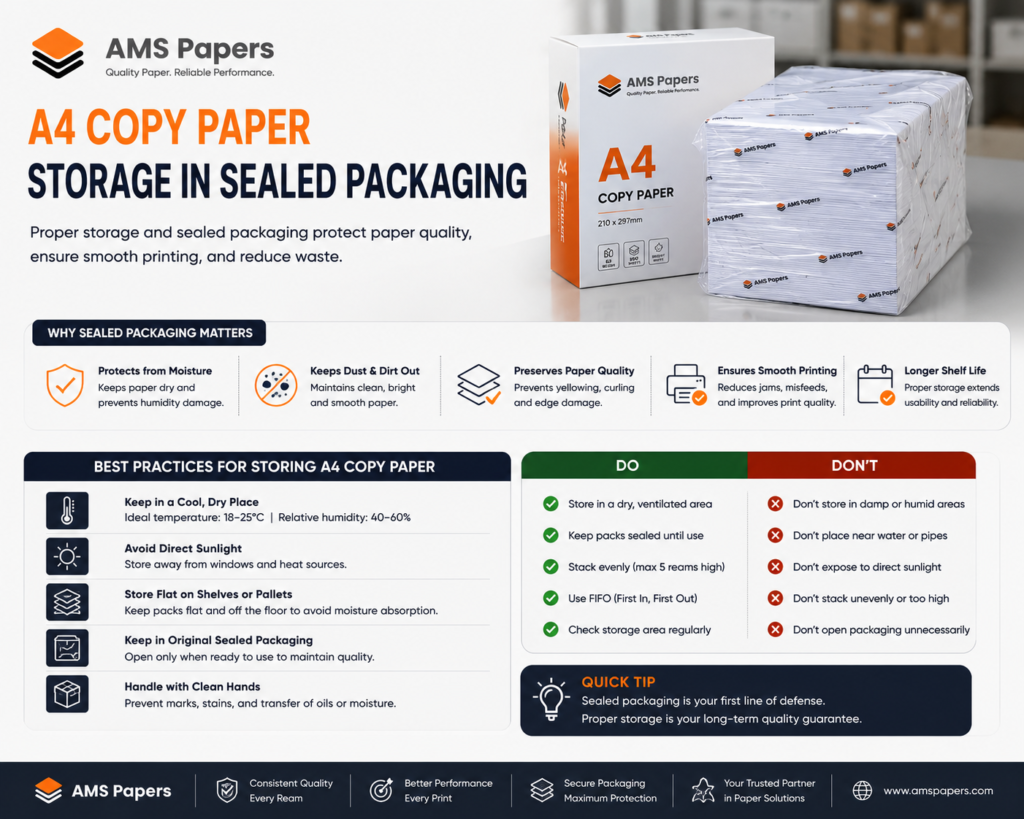
Correct storage protects every other spec you’ve paid for. Keep paper in a stable environment with moderate humidity ideally between 45–55% relative humidity and avoid storage areas prone to temperature swings, such as spaces near loading docks, direct sunlight, or uninsulated storage rooms.
Keep reams in their original sealed packaging until use; the wrapping is specifically designed to maintain consistent moisture content. Store paper flat rather than on its edge to prevent warping, and avoid stacking reams too high, which can cause pressure-related deformation over time. In warehouse environments, paper should be stored off the floor on pallets to avoid moisture absorption from concrete, and away from exterior walls where temperature fluctuation is greatest.
Sustainability and Responsible A4 Copy Paper Sourcing
Responsible paper sourcing is increasingly part of business ESG goals, not just an environmental preference. Look for paper certified by the Forest Stewardship Council (FSC) or the Programme for the Endorsement of Forest Certification (PEFC), both of which verify that paper originates from responsibly managed forests rather than uncontrolled logging.
Recycled-content paper is another option worth evaluating, particularly for internal or draft printing where brightness and finish matter less. When comparing suppliers, ask whether certification applies to the specific product you’re ordering not just as a general company claim since certification at the SKU level is what actually holds up if your own business needs to report on sourcing for ESG or procurement compliance purposes.
Why Businesses Choose AMS Papers for A4 Copy Paper
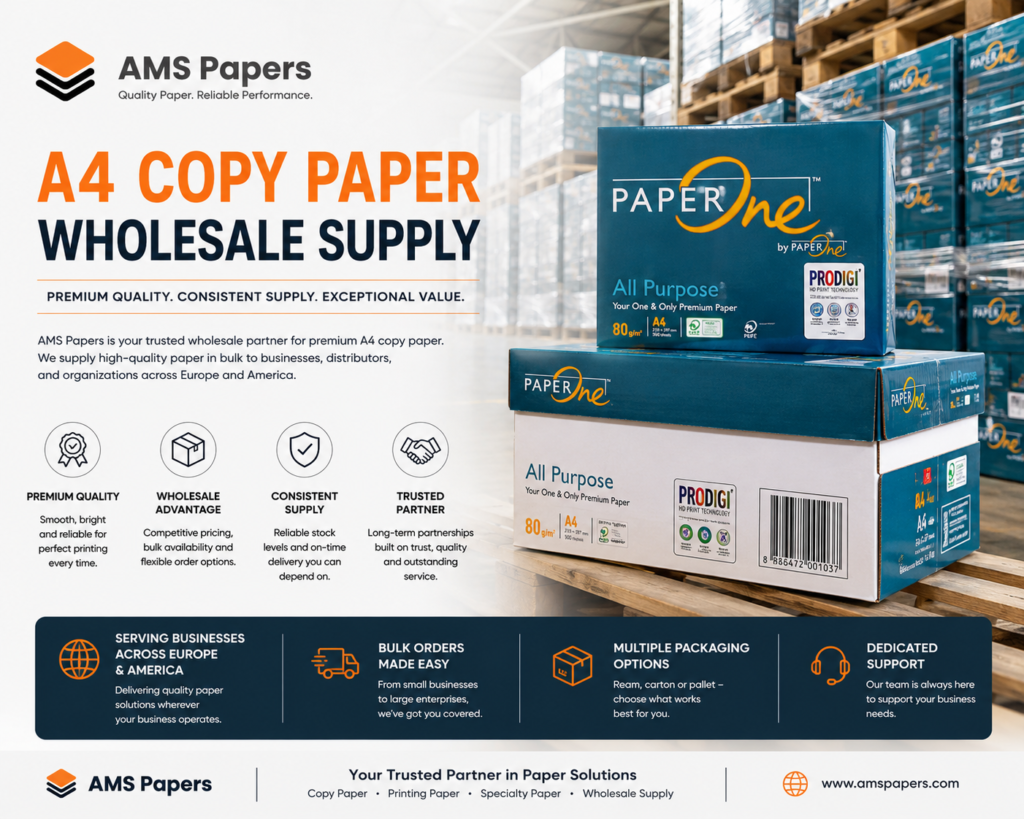
AMS Papers supplies A4 copy paper across multiple GSM and brightness grades including verified branded stock such as Navigator, PaperOne, HP, and Double A with clear disclosure of what’s branded versus private-label on every listing. We’ve supported businesses across Europe, America, and international markets since 2008, with order structures built around both wholesale volume and smaller, recurring business needs.
Our focus is consistency: the same GSM, brightness, and finish batch after batch, backed by documentation you can actually verify rather than take on faith. For businesses that depend on predictable print performance offices, schools, print shops, and retailers alike that consistency is the difference between paper that works and paper that becomes a recurring problem.
Conclusion
Choosing the right A4 copy paper isn’t a five-minute decision, even though most businesses treat it as one. GSM, brightness, opacity, and moisture content each affect how reliably your paper performs and reliability, not price per ream, is what actually determines your real cost per print. Consistency from a trusted supplier protects your printers, your time, and your document quality far more than chasing the lowest quote.
Before your next order, use the questions in this guide to evaluate your current supplier or a prospective one and treat documentation and consistency as non-negotiable, not a nice-to-have.
Explore AMS Papers‘ A4 Copy Paper Range
FAQ
What GSM is best for office printing? Most offices do best with 75–80 GSM for everyday printing it balances cost with a professional finish suitable for both internal use and client-facing documents.
Is 80 GSM better than 75 GSM? Not universally “better” 80 GSM is slightly heavier and often has marginally better opacity, making it a common choice for client-facing or double-sided documents, while 75 GSM suits high-volume everyday printing at a lower cost.
Can A4 paper damage printers? Yes paper with inconsistent GSM, poor moisture control, or rough finish can cause jams, misfeeds, and increased wear on rollers and feed mechanisms over time, particularly with frequent use.
How many sheets are in a ream? A standard ream of A4 copy paper contains 500 sheets, though some suppliers also offer smaller packs (250 sheets) or bulk cartons of multiple reams.
Is brighter paper always better? No higher brightness improves contrast and image quality, which matters for presentations and client materials, but it isn’t necessary (or worth the added cost) for internal drafts and everyday printing.
Can inkjet and laser printers use the same paper? Many A4 copy paper products are designed to work with both, but it’s worth checking the packaging or product spec, since some coated or specialty papers are optimized for one printing method specifically.
How should copy paper be stored? In its original sealed packaging, in a stable environment with moderate humidity (45–55%), away from direct sunlight, temperature swings, and stored flat rather than on edge to prevent warping.
Should businesses buy paper in bulk? For businesses with steady, predictable consumption, buying in bulk can lower cost per ream and reduce reorder frequency but it only pays off if storage conditions are adequate, since poorly stored bulk paper degrades before it’s used.
How long does A4 paper last in storage? Properly stored, sealed A4 copy paper can remain in good condition for one to two years or longer; the limiting factor is usually storage conditions (humidity, temperature) rather than a fixed shelf life.
How do I choose a reliable A4 paper supplier? Look for a supplier who discloses whether products are branded or private-label, can provide certification documentation tied to the specific product, guarantees batch-to-batch consistency, and has a track record of on-time, predictable delivery.
3 Responses