
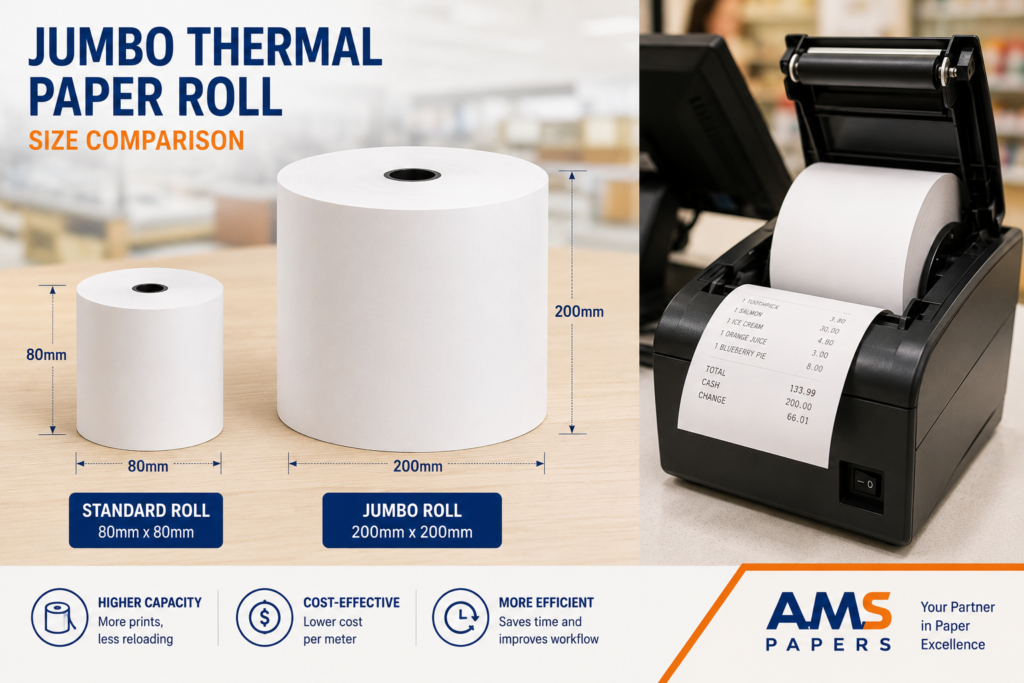
If you’ve ever loaded a roll into a receipt printer only to find it’s too wide, too tight on the spindle, or runs out twice as fast as it should, you already know why size matters. Choosing the right jumbo thermal paper rolls for your POS system or printer model comes down to three thermal paper sizing guide measurements width, diameter, and core size and getting even one of them wrong means jams, wasted paper, or a roll that simply won’t fit.
Thermal paper sizing guide walks through exactly how to match jumbo thermal paper rolls to your specific hardware, when jumbo rolls make sense over standard sizes, and what to know before buying in bulk whether you’re running a single checkout counter or a multi-location retail operation.
What Are Jumbo Thermal Paper Rolls?
A jumbo thermal paper roll is simply a larger-diameter version of the standard thermal paper roll used in receipt printers, POS terminals, and label machines. Instead of holding a shorter length of paper on a small core, jumbo rolls pack significantly more paper onto a wider roll meaning fewer roll changes, less downtime, and often a lower cost per foot of paper.
Thermal paper itself doesn’t use ink or toner. It’s coated with a heat-sensitive layer that darkens when it passes under the printer’s thermal print head, which is why thermal receipt printers are faster and have fewer moving parts than impact or inkjet printers.
Jumbo Rolls vs. Standard Thermal Paper Rolls
The core difference between jumbo and standard thermal paper rolls isn’t the paper itself it’s the amount of it.
- Standard rolls are typically shorter (around 150–230 feet) and sized for compact, countertop receipt printers.
- Jumbo rolls hold considerably more length often 300 feet or more on a larger diameter, making them better suited for high-volume printers, kiosks, and back-office use.
Both use the same thermal coating technology; the choice between them mostly comes down to your printer’s physical roll compartment size and how often you’re willing to swap rolls.
Key Measurements: A Thermal Paper Sizing Guide for Every Roll
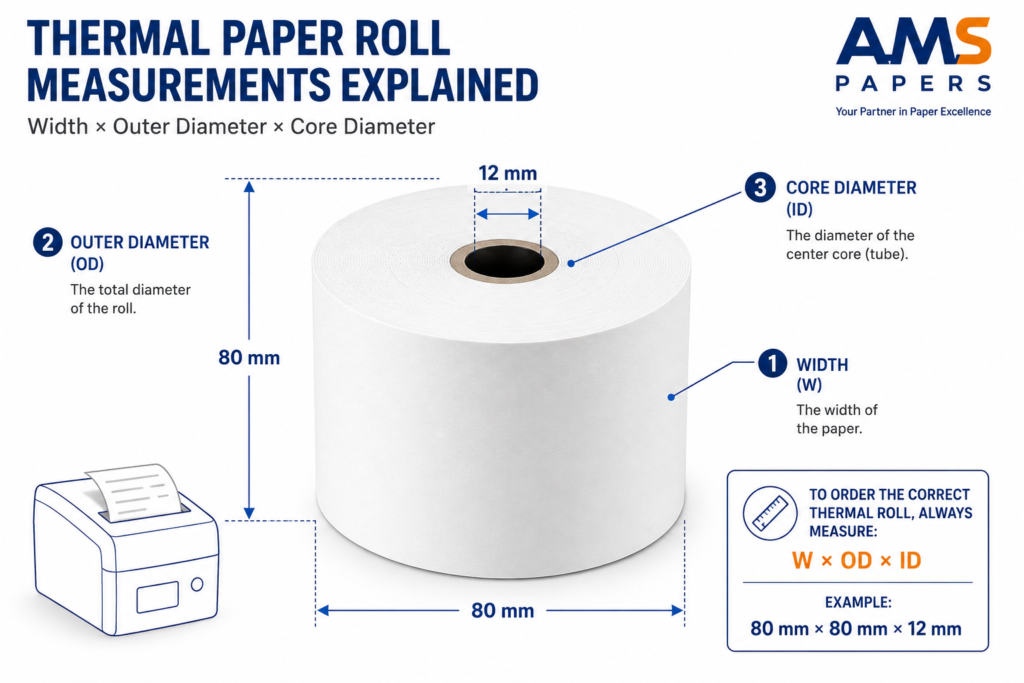
Before ordering any thermal paper, there are four measurements worth knowing. Get these right, and compatibility becomes simple.
1. Roll Width
This is the width of the paper itself, usually measured in millimeters. Common widths include:
- 57mm — compact POS printers, credit card terminals, small receipt printers
- 80mm — the most common width for standard retail POS receipt printers
- 112mm–114mm — wider format, often used in kiosks or specific ATM/banking printers
Width is almost always printed on the printer’s spec sheet or on a label inside the paper compartment. Using the wrong width paper won’t feed correctly, even if it technically fits.
2. Roll Diameter (Outer Diameter / OD)
This is the total diameter of the wound roll, and it’s the measurement that determines whether a roll physically fits inside your printer’s paper compartment.
- Standard rolls: usually 40–50mm diameter
- Jumbo rolls: commonly 150mm–200mm+ diameter, depending on the printer model
If your printer wasn’t designed for jumbo rolls, forcing an oversized roll into a compact compartment simply won’t work this is the single most common compatibility mistake.
3. Core Size (Inner Diameter / ID)
The core is the cardboard or plastic tube the paper is wound around, and its inner diameter needs to match the spindle or holder inside your printer.
- Small core sizes: around 11mm–12mm (common in compact receipt printers)
- Jumbo core sizes: often 22mm or larger, since jumbo rolls need a sturdier core to support the extra paper weight
A roll with the correct width but wrong core size still won’t sit properly on the printer’s spindle.
4. Paper Thickness (Gauge)
Thickness affects both print quality and how many feet of paper fit onto a roll of a given diameter. Thermal paper thickness is typically measured in microns, with standard receipt paper falling in the 55–65 micron range. Thicker paper tends to hold up better for longer receipts or high-friction environments, but slightly reduces the total length that fits on a jumbo roll.
Thermal Paper Sizing Guide: Matching Rolls to Your POS or Printer Model
Once you know the four key measurements, matching paper to your specific hardware becomes a straightforward lookup rather than trial and error.
Step 1: Check Your Printer’s Manual or Spec Sheet
Every POS printer manufacturer publishes supported paper specifications width, maximum roll diameter, and core size — in their technical documentation. This is the single most reliable source, since it accounts for the exact model you own rather than a general assumption. For example, official documentation from manufacturers like Epson’s POS printer support or Star Micronics’ printer specifications lists the maximum roll diameter and paper width for each printer model.
Step 2: Measure Your Current Roll (If You Don’t Have the Manual)
If you’re replacing paper for an existing printer and don’t have documentation handy, measuring your current roll takes less than a minute:
- Measure width — lay the roll flat and measure straight across the paper (not the packaging).
- Measure outer diameter — measure the widest point of the wound roll.
- Measure the core — measure the inner diameter of the empty cardboard tube.
- Note the paper color coating — most thermal paper is white, but some printers use colored-coating variants for specific alert receipts.
Jotting these three numbers down means you can order confidently from any supplier, even without the original packaging.
Step 3: Compare Against Common Roll Sizes by Printer Type
| Printer/Device Type | Typical Width | Typical Roll Type | Notes |
|---|---|---|---|
| Compact card terminals | 57mm | Standard | Small core, short length |
| Standard retail POS printers | 80mm | Standard or jumbo | Most common configuration |
| High-volume checkout / grocery POS | 80mm | Jumbo | Fewer roll changes during peak hours |
| Kiosk and self-checkout printers | 80mm–112mm | Jumbo | Designed for extended unattended use |
| ATM / banking printers | 80mm–112mm | Varies by model | Always confirm against manufacturer spec |
| Label printers (shipping/barcode) | Varies widely | Standard (die-cut or continuous) | Different paper category from receipt rolls |
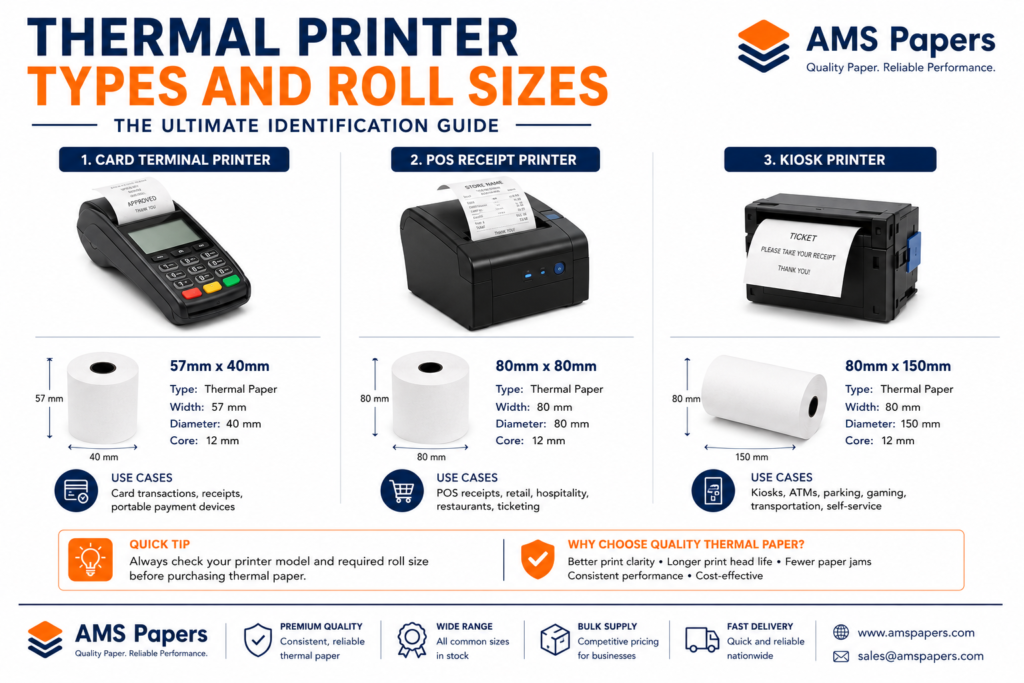
If your printer supports jumbo rolls, switching from standard to jumbo is usually as simple as confirming the maximum diameter your paper compartment can hold most POS printers built for high-volume environments are designed with this flexibility in mind.
Thermal Paper Quality Guide: BPA-Free and Coating Considerations
Not all thermal paper is manufactured the same way, and the coating chemistry matters for both compliance and print longevity.
Why BPA-Free Thermal Paper Matters
Traditional thermal paper coatings have historically used BPA (Bisphenol A) as a color-developer chemical. Due to health and environmental concerns, many regions have moved toward BPA-free formulations, often using BPS or phenol-free alternatives instead. Regulatory guidance from bodies like the European Chemicals Agency (ECHA) has restricted BPA use in thermal paper specifically because of its ability to transfer to skin during regular handling.
For businesses, choosing BPA-free thermal paper isn’t just a compliance checkbox it’s increasingly something customers and employees expect, particularly in food service, healthcare, and retail environments with frequent receipt handling.
Thermal Paper Grade and Print Longevity
Cheaper thermal paper coatings can fade significantly faster than higher-grade coatings, especially when exposed to heat, sunlight, or plastic bags (a common cause of premature receipt fading). If your business needs receipts that stay legible for warranty claims, returns, or tax records, it’s worth checking the coating grade rather than buying on price alone.
Thermal Paper Roll Sizing: Jumbo vs. Standard, Which Should You Buy??
This decision really comes down to print volume and how much staff time you want to spend swapping rolls.
Jumbo rolls make sense when:
- You’re running a high-transaction-volume checkout (retail, grocery, quick-service restaurants)
- Your printer is left unattended for long stretches (self-checkout, kiosks)
- You want to reduce the frequency of roll changes across multiple registers
- You’re buying centrally for multiple locations and want fewer total SKUs to manage
Standard rolls make sense when:
- Your printer’s compartment is only designed for a small-diameter roll
- Print volume is low (a single low-traffic counter, occasional printing)
- You want to minimize paper sitting in storage before use, since thermal paper has a shelf life
Buying jumbo rolls for a printer that physically can’t hold them is one of the most common and easily avoidable ordering mistakes. Always confirm maximum supported diameter before switching formats.
Real-world example: A regional coffee chain switched three of its busiest locations from standard 80mm rolls to jumbo rolls after noticing staff were changing paper multiple times per shift during morning rushes. Before ordering, the operations team used a thermal paper sizing guide to confirm the printers at those locations already supported a larger diameter compartment, so the switch required no hardware change — just checking the maximum diameter listed in the printer’s spec sheet. Roll changes dropped from several times a day to roughly once per shift, and staff time previously spent on paper changes was redirected to the counter during peak hours. For any multi-location rollout like this, a thermal paper sizing guide is worth checking before ordering in bulk, since confirming compatibility upfront avoids receiving cases of the wrong roll size.
How Jumbo Rolls Affect Total Cost of Ownership
Comparing jumbo and standard rolls purely on price per roll misses part of the picture. A more accurate comparison looks at:
- Cost per foot of paper — jumbo rolls often have a lower cost per foot, even if the per-roll price is higher
- Labor time spent changing rolls — more frequent changes mean more interruptions, especially during busy periods
- Waste from partial rolls — shorter rolls are more likely to be swapped out early when a register is closed for the day, leaving unused paper
- Storage efficiency — fewer, larger rolls can sometimes be easier to organize than many small ones, though this depends on available shelf space
For a single low-volume counter, these differences are minor. Multiply them across ten registers running extended hours, and the time and paper savings become meaningful.
Understanding Wholesale Thermal Paper Purchasing
Once a business moves beyond single-roll purchases, wholesale thermal paper buying introduces a few concepts worth understanding clearly.
What Does “Wholesale Paper” Mean?
Wholesale paper simply refers to purchasing paper products in bulk quantities directly from a manufacturer, distributor, or dedicated wholesale supplier usually at a lower per-unit price than retail purchasing. For thermal paper specifically, this typically means ordering by the case (multiple rolls) or by pallet, rather than individual rolls from a retail shelf.
What Is MOQ (Minimum Order Quantity) in Wholesale Paper?
MOQ, or Minimum Order Quantity, is the smallest quantity a supplier is willing to sell in a single order. For thermal paper, MOQ often applies at the case level (for example, a minimum of 1 case of 50 rolls) or at a larger pallet level for direct-from-manufacturer pricing.
- Manufacturing and packaging costs are more efficient at scale
- Shipping a small quantity often costs nearly the same as shipping a larger one
- Suppliers want to ensure order volumes justify the administrative and logistics overhead
If your business doesn’t yet need pallet-level quantities, look for suppliers who offer case-level MOQs rather than requiring a full pallet commitment upfront.
How Do Pricing Tiers Work?
Most wholesale paper suppliers use tiered pricing, where the price per roll decreases as order quantity increases. A simplified example:
| Order Quantity | Typical Price Tier |
|---|---|
| 1–5 cases | Standard case price |
| 6–20 cases | Reduced per-case price |
| 21+ cases or pallet | Lowest per-case price |
The logic is straightforward: larger orders reduce the supplier’s per-unit shipping and handling costs, and that savings gets passed down through the pricing tier.
When Does Buying Wholesale Paper Make Sense?
Wholesale purchasing typically makes financial sense when:
- You have predictable, ongoing paper consumption (not one-off need)
- You have adequate dry storage space for bulk inventory
- Your cash flow supports a larger upfront order in exchange for a lower per-unit cost
- You’re managing paper needs across multiple registers or locations
It usually doesn’t make sense for very low-volume, occasional use, where paper might sit in storage long enough to start degrading before it’s used.
How Do Businesses Choose the Right Supplier?
A few criteria consistently separate reliable wholesale paper suppliers from risky ones:
- Clear specifications — width, diameter, core size, and coating type listed transparently
- Consistent quality between orders — no unexplained variation in coating or thickness
- Reasonable MOQs — flexible enough for growing businesses, not just large enterprises
- Reliable delivery timelines — especially important for businesses that can’t afford to run out
- BPA-free options available — for businesses with compliance or customer-facing concerns
Thermal Paper Sizing Guide Checklist Before You Order
Before placing a bulk or wholesale order, run through this quick checklist to avoid a mismatched shipment:
- Confirmed paper width matches printer specification (57mm, 80mm, or other)
- Confirmed maximum roll outer diameter your printer compartment supports
- Confirmed core inner diameter matches your printer’s spindle
- Checked whether your printer supports jumbo rolls at all, or only standard sizing
- Decided whether BPA-free coating is required for your business or region
- Requested a sample roll from a new supplier before committing to a large wholesale order
- Confirmed the supplier’s MOQ fits your current storage capacity and usage rate
Keeping these details on file ideally noted in whatever system you use to reorder supplies makes future orders far faster, since you won’t need to re-measure or re-check documentation each time.
Common Mistakes When Buying Jumbo Thermal Paper Rolls
Even experienced buyers run into a handful of avoidable issues:
- Assuming “jumbo” means one universal size. Jumbo rolls vary significantly in diameter between manufacturers and printer models always check the maximum diameter your specific printer supports.
- Ignoring core size. A roll can be the right width and still not fit if the core diameter doesn’t match the spindle.
- Buying on price alone. Lower-grade thermal coating can fade faster, which matters for receipts used for returns, warranties, or expense tracking.
- Not accounting for storage conditions. Thermal paper is sensitive to heat and light poor storage shortens its usable shelf life before it’s even loaded into a printer.
- Overbuying without adequate storage. Wholesale pricing looks appealing, but paper sitting too long in suboptimal conditions can degrade before use.
Storage and Handling Best Practices for Thermal Paper Rolls
Thermal paper’s heat-sensitive coating means it behaves differently from standard copy paper when it comes to storage:
- Keep rolls away from direct sunlight and heat sources. UV exposure and heat can prematurely activate the thermal coating, causing rolls to darken or fade unevenly before use.
- Avoid storing near plastic bags, cling film, or certain adhesives. Some materials contain chemicals that react with thermal coating, causing spotting or fading a common cause of receipts fading inside a plastic shopping bag.
- Store in a cool, dry area, similar to standard office paper high humidity can also affect print quality.
- Rotate stock (first in, first out). Thermal paper has a finite shelf life, typically several years under good storage conditions, but rotating stock avoids using aged paper first.
Frequently Asked Questions
What size are most jumbo thermal paper rolls? Most jumbo thermal paper rolls used in POS printers are 80mm wide, with an outer diameter between 150mm and 200mm, though exact sizing varies by printer manufacturer.
How do I know what size thermal paper my printer needs? Check your printer’s manual or manufacturer spec sheet for supported paper width, maximum roll diameter, and core size. If documentation isn’t available, measure your current roll’s width, outer diameter, and core diameter directly.
Can I use a jumbo roll in a printer designed for standard rolls? No if your printer’s paper compartment is sized for a standard roll’s smaller diameter, a jumbo roll won’t physically fit, regardless of matching width or core size.
What’s the difference between 57mm and 80mm thermal paper? 57mm paper is typically used in compact card terminals and small receipt printers, while 80mm is the standard width for most retail POS receipt printers. The two are not interchangeable.
Is BPA-free thermal paper necessary? It’s not universally required everywhere, but many regions have restricted or banned BPA in thermal paper coatings due to health concerns, and many businesses now prefer BPA-free paper as a standard practice for customer and employee safety.
How long does thermal paper last before it fades? Under good storage conditions (cool, dry, away from direct light), quality thermal paper typically stays legible for one to several years, though exact longevity depends on the coating grade and storage environment.
What does MOQ mean when buying thermal paper wholesale? MOQ stands for Minimum Order Quantity — the smallest amount a supplier will sell in a single order, often set at the case or pallet level for wholesale thermal paper purchasing.
Is it cheaper to buy thermal paper rolls in bulk? Generally yes wholesale suppliers typically offer tiered pricing where the cost per roll decreases as order volume increases, though this only pays off if the business has consistent usage and adequate storage.
Why does my thermal paper roll run out faster than expected? This is often due to using a shorter, lower-length roll for high-volume printing rather than a jumbo roll, or a printer set to print longer receipts (extra promotional text, itemized details) than necessary.
Can thermal paper rolls be used in label printers? Some label printers use thermal-based paper, but the rolls are typically formatted differently (die-cut labels or continuous label stock) rather than standard receipt-style rolls, so the two aren’t usually interchangeable.
Conclusion
Choosing the right specifications starts with a reliable thermal paper sizing guide matching four measurements: width, outer diameter, core size, and paper thickness, against your specific POS or printer model’s supported specifications. Getting this right the first time avoids jammed printers, wasted paper, and unnecessary reorders, while choosing quality, BPA-free paper protects both compliance and print longevity for records that matter.
For businesses moving toward higher-volume printing or managing multiple registers, jumbo thermal paper rolls reduce how often staff need to change paper, and buying wholesale, once volume justifies it, brings the per-roll cost down further. Whether you’re outfitting a single checkout counter or a full multi-location operation, keeping a thermal paper sizing guide on hand for your team makes it easy to confirm the exact specifications before ordering the simplest way to get it right the first time.